
If you’ve ever tried to build a chat app in React, you’ll know how hard it is to make text appear smoothly in real time. Every time a message or token comes in, you update state, React re-renders, and suddenly the interface starts to stutter.
But the text feels natural when you utilize ChatGPT. Without your browser slowing down, words come up one after the other, nearly instantly.
So how can this happen with ChatGPT? And more importantly, how can you use the same approach in your own React projects?
This article explains the idea in simple words. We’ll look at why the obvious approach causes lag, how buffering and batching fix it, and which extra tricks help keep the experience smooth, even in long chat sessions.
Why Does Streaming Cause Lag in React app?
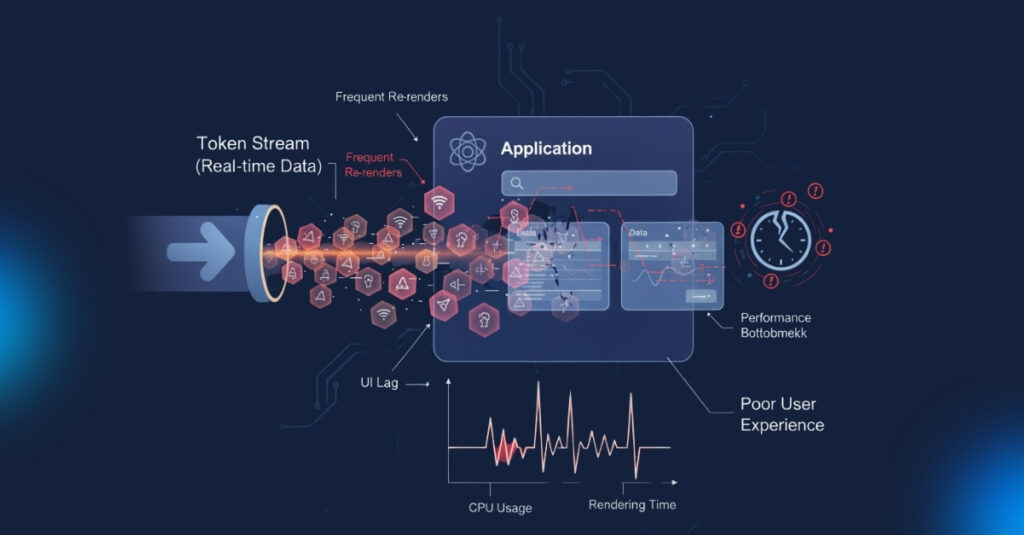
React is faster, but it’s not designed to re render on every tiny updates. Imagine a new token arrives from your API:
- You add it straight into React state.
- React re-renders the component tree.
- The UI updates with that one token.
- Then another token comes in, and the cycle repeats hundreds of times.
That’s a lot of unnecessary work. As the tokens pile up, the interface struggles to keep up. This is why a naïve implementation feels choppy.
A Naive Solution (and why it doesn’t work)
The most common initial attempt at this is like this:
// ❌ Each token triggers a full re-render
setMessages(prev => [...prev, newToken]);
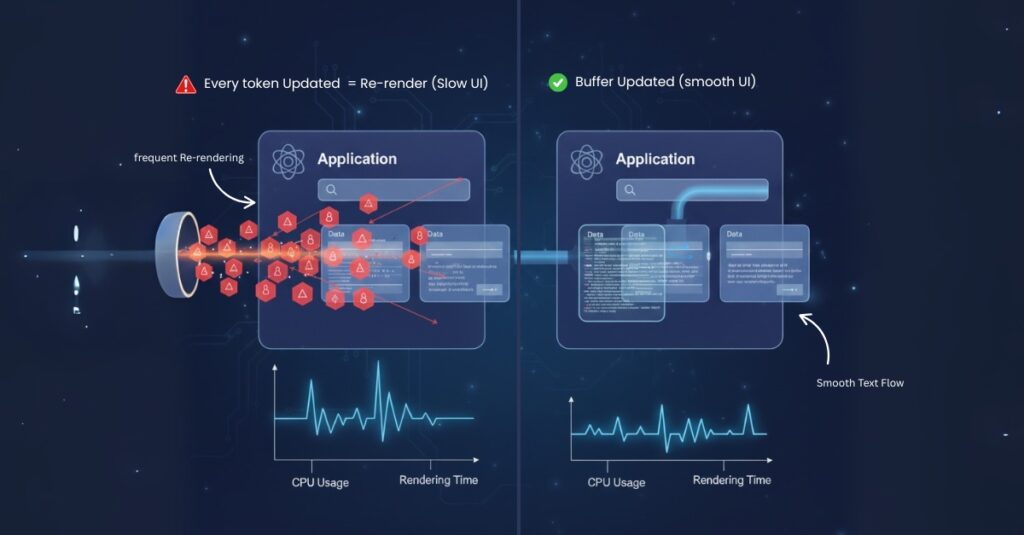
This works fine for a short demo but breaks down with longer responses. Every token forces React to work harder than it needs to.
The Real Trick: Buffering and Batching
- Instead of re-rendering on every token, ChatGPT separates the process of receiving tokens from updating the UI.
Buffering: Tokens are collected in a temporary store (like a ref) without re-rendering. - Batching: At regular intervals, the buffered tokens are moved into state.
The user still sees text streaming naturally, but React only re-renders a handful of times per second instead of hundreds.
How to Buffer Tokens
Refs are perfect for this. Unlike state, they don’t cause re-renders when updated.
const bufferRef = useRef([]);

function onNewToken(token) {
  bufferRef.current.push(token);
}
This way, tokens can flow in freely without touching React’s render cycle.
How to Batch Updates
Once you have tokens in a buffer, you decide when to show them. For example, you can run an interval that flushes the buffer into state every 50 milliseconds:
useEffect(() => {
  const interval = setInterval(() => {
    if (bufferRef.current.length > 0) {
      setMessages(prev => [...prev, ...bufferRef.current]);
      bufferRef.current = [];
    }
  }, 50); // update 20 times per second

  return () => clearInterval(interval);
}, []);
This approach reduces re-renders dramatically while still looking real time.
Why It Feels Instant
Even though updates are batched, the human eye can’t see the difference. As long as the interval is short enough (30–50ms is ideal), it looks like text is arriving word by word.
That’s the secret: illusion of real time, powered by smart batching.
Dealing with Long Chat Sessions
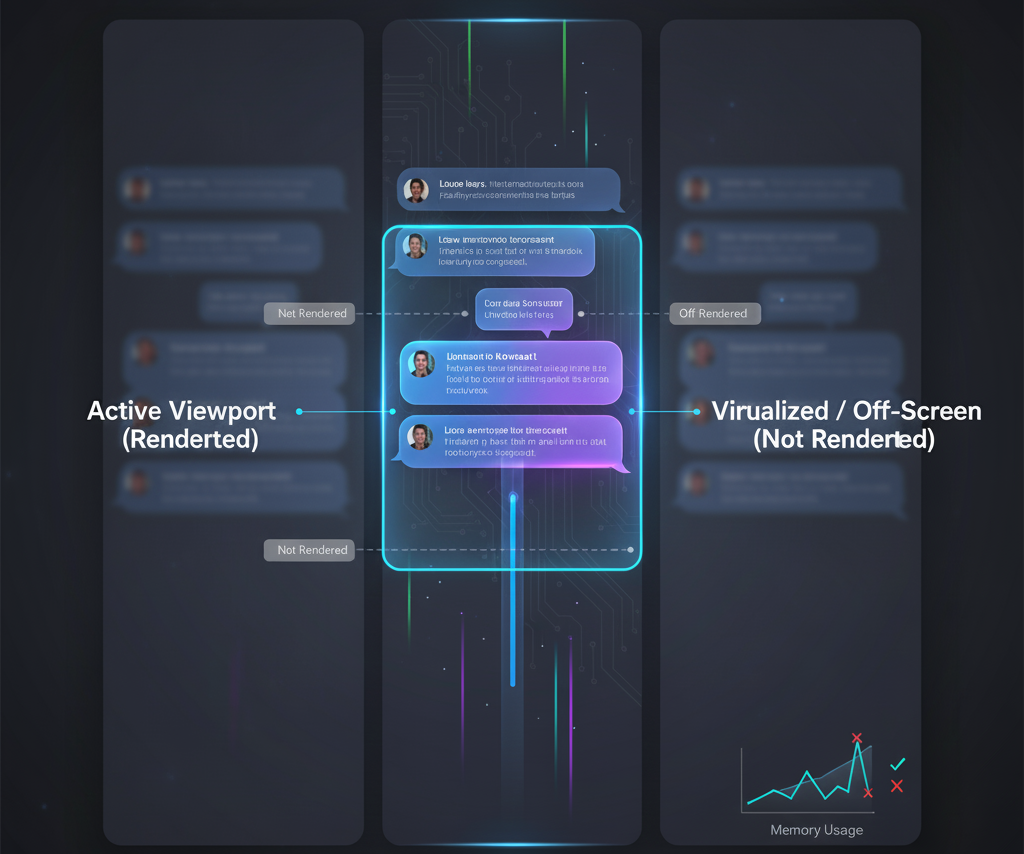
Smooth streaming is only half the challenge. Once your chat has hundreds of messages, rendering them all at once will slow things down.
The fix is virtualization. Tools like react-window or react-virtualized only render the messages currently visible on screen.
This keeps the UI light and fast, no matter how many messages are in memory.
Using requestAnimationFrame
Another trick is to tie updates to the browser’s refresh cycle. With requestAnimationFrame, you schedule updates to match the screen’s paint rate, usually 60 times per second.
requestAnimationFrame(() => {
  setMessages(prev => [...prev, ...bufferRef.current]);
  bufferRef.current = [];
});
This can make animations and typing effects feel smoother.
Modern React Features
React now has concurrent features like useTransition and useDeferredValue. These don’t change how tokens stream, but they help keep the UI responsive. For example, a user typing in the chat box won’t feel blocked while tokens are streaming in.
Putting It Together: Example Code
Here’s a simple implementation of a smooth chat stream:
import { useEffect, useRef, useState } from "react";

export default function ChatStream() {
  const [messages, setMessages] = useState([]);
  const bufferRef = useRef([]);

  function receiveToken(token) {
    bufferRef.current.push(token);
  }

  useEffect(() => {
    const interval = setInterval(() => {
      if (bufferRef.current.length > 0) {
        setMessages(prev => [...prev, ...bufferRef.current]);
        bufferRef.current = [];
      }
    }, 50);

    return () => clearInterval(interval);
  }, []);

  return (
    <div>
      {messages.map((msg, idx) => (
        <p key={idx}>{msg}</p>
      ))}
    </div>
  );
}
This example uses buffering and batching, which is enough for most small projects. You can layer virtualization and requestAnimationFrame on top for more complex apps.
Other Tips for Performance
- Split components so only the chat window updates, not the whole app.
- Throttle expensive effects like syntax highlighting or markdown rendering.
- Lazy load media such as images, videos, and files so they don’t block text streaming.
Conclusion
ChatGPT feels magical, but the idea behind it is simple. It doesn’t re-render on every token. Instead, it buffers tokens and batches updates so the UI looks instant without overloading React.
If you are building a chat app, remember: React should only work as hard as it needs to. By controlling updates, your interface can feel just as smooth as ChatGPT.
FAQs
Does ChatGPT really render word by word?
Not exactly. It renders small batches of tokens at short intervals that feel like word by word updates.
Why not just use state directly?
Because every state update forces a re-render. Hundreds of them per second will freeze the UI.
What’s the best batch interval?
Somewhere between 30ms and 100ms. Below that is unnecessary, above that may look choppy.
Do I need Redux or Zustand?
No. Simple refs and intervals are enough for streaming. A state manager is useful if you need more complex control across multiple components.
How do I handle long chat sessions?
Use virtualization so that only the messages visible on screen are rendered.
Leave a Reply